

![Running ABM on LinkedIn – The Ultimate Guide [Updated for 2026]](/_next/image?url=https%3A%2F%2Fwp.zenabm.com%2Fwp-content%2Fuploads%2F2025%2F03%2FRunning-ABM-on-LinkedIn-The-Ultimate-Guide.png&w=3840&q=75)
When I wrote the first edition of this post about our Linkedin ABM strategy at Userpilot – we were 5 months after launching our first-ever ABM (Account Based Marketing) campaign, with the following results: over $900,000 in pipeline, with $8 in pipeline per $ spend. Now – in January 2026 – a full 16 months since our first “LinkedIn ABM” campaign launch – we’re at over $5 million (!) in pipeline with over $10 in pipeline per $ spent ($490k in ad spend) – and over 2x ROAS (Return on Ad Spend) in Closed Won Revenue. 🥳 To say I’m happy with the results is to say nothing at all – seeing the success, for 2026, we’ve 4 xed our LinkedIn Ads budget.
But ofc – the purpose of this post is not to brag – but to share how we did that (exactly) to get to those results and what I’ve learned & changed about our ABM Linkedin strategy since the first “edition” of this post (written less than a year ago.) If you feel “lost at sea” with how to start your LinkedIn ABM program – this post will hopefully be the answer (when I was starting out, I couldn’t find any tactical step-by-step guides for this – so I vouched to write one as soon as I got some results and learnings myself!
As you may expect – figuring out how to run ABM programs on Linkedin with so little practical (and tactical) information out there was a real grind – and me & my team made a lot of mistakes on our way. I’m sharing them as well so you can avoid those (costly) mistakes yourself.

For the past 5 years, Userpilot growth has come 100% from inbound – with the majority from organic SEO traffic. At our peak in early 2024, we would publish up to 150 content pieces per month, driving 235,000 monthly visitors. But at some point – SEO content started to bring diminishing returns – for both internal and external reasons. Nobody who works in marketing needs explaining that since AI overviews started rolling out, it’s been “quite the ride” in SEO – with relentless Google updates throwing many website’s content efforts against the wall, and extreme SERP volatility. After a year of ups and downs, our traffic finally settled, but didn’t really increase. And even after hiring a really *stellar* head of SEO – the pipeline from organic hasn’t really grown. So without ABM – we would have been in a dark place (and esp myself, as the VP of marketing who makes these decisions 😬).
But we also noticed something more tricky – as our product became more robust and our prices increased (in 2024, we almost doubled our ACV!) – our conversion rate from SEO started slowly decreasing. It seemed like while organic SEO traffic really worked for cheaper, transactional B2B sales – it started to limp when our ACV grew and the sales cycles became more enterprise-oriented – and longer. At some point our CEO called me out for having built a ‘siloed marketing department’ – with every function paddling independently towards their own goals, without collaborating much, and definitely without creating the much-wanted ‘flywheel effect’ – where the team’s effort contributes to more than the sum of its parts. It was time for me to act – and ABM or die trying…


Ok I do realize this post turned out very long – I think it will be worth reading – but if you’re in a hurry, here’s a quick summary – what we did & achieved with our LinkedIn ABM strategy over the past ~16 months:
Why ABM on LinkedIn worked for us
As ACV increased and deals became more enterprise-focused at Userpilot, inbound SEO stopped scaling. LinkedIn ABM let us consistently reach buying committees and became our most predictable pipeline channel.
How we built the target audience
We targeted 26,315 accounts over 16 months using firmographics, technographics, and CRM win loss data. Accounts were synced from HubSpot to LinkedIn and filtered by persona using native LinkedIn targeting.
Account scoring and stages
We scored accounts purely on LinkedIn engagement using ZenABM and divided them into Identified, Aware, Interested, Considering, and Selecting. Thresholds were impressions, clicks, engagements, demos, and open deals.
How we measured impact
We measured weekly account movement between stages, pipeline influenced, and pipeline per dollar spent. Leads were not used as a success metric.
How we set total ABM budget
We worked backwards from revenue goals using ACV, close rate, qualification rate, and expected stage conversion benchmarks. Over 16 months, total LinkedIn ad spend was ~$490k, tied directly to pipeline targets.
Budget allocation formula per campaign
We used the rule: monthly budget ÷ 30 ÷ (avg CPC × 4 clicks) = max effective ads. With ~$8 CPC and ~$10k monthly budget, this limited us to a small number of ads per campaign to avoid budget dilution.
Campaign structure and asset mix
Campaigns were grouped by shared intent rather than persona to ensure enough engagement per account. Our asset mix was single image ads, Thought Leader Ads, carousel ads, video ads, then text ads.
How many ads we ran
Across campaigns, we launched 500+ ads over time. Early campaigns had ~100 ads across personas, later iterations reduced ad count per campaign to improve learning speed.
Most effective ad formats
Single image ads delivered the lowest CPC and most reliable traffic. Video ads worked well for awareness, while Thought Leader Ads drove engagement but inflated CTR due to interaction mechanics.
Project management and execution
We managed campaigns and assets in Notion with strict naming conventions for persona, intent, stage, and asset type. This made automation, reporting, and sales handoff scalable.
Tools we used
Core stack was HubSpot for CRM and workflows, LinkedIn Campaign Manager for ads, Clay and BuiltWith for list building, Notion for project management, and ZenABM for engagement data, account scoring, and reporting.
Reporting and dashboards
We initially built dashboards in HubSpot but moved reporting to ZenABM for stability and speed. ZenABM became the source of truth for account stages, engagement, and pipeline attribution.
Key metrics we tracked
Accounts per stage per week, stage conversion rates, pipeline influenced, pipeline per dollar spent, and ad-level CPC and CTR for diagnostics.
Results after 16 months
We generated $5.29M in pipeline from $490k ad spend, reaching $10.79 pipeline per dollar spent and over 2x ROAS in closed-won revenue.
Verdict
LinkedIn ABM outperformed cold outbound for higher ACV deals, generating pipeline faster with fewer people. Once the system was in place, results became repeatable and predictable.
If you feel “lost at sea” with how to start your LinkedIn ABM program – I totally feel you. My beginnings with LinkedIn ABM were also quite brutal – as there were no playbooks when we started, Most ABM resources are very high-level (‘strategic’). I couldn’t find any tactical resources on how to set the campaigns up.
Busting Silos by Hillary Carpio
And no wonder – no one wants to share exactly how they set up their campaigns and what were their “winning formulas” (top performing LinkedIn ad formats etc. – actually, I’ve recently done an analysis of 160k ads from 211 ZenABM users so you can check it out – and ZenABM is my husband’s startup which essentially productizes what I’ve done with ABM in a “DIY” way – so I do recommend you check it out as well 😉
…let alone how much they’ve spent on their campaigns and what ROAS they’ve achieved!

Ok so you have little info – and yet – before even starting to work on your first (LinkedIn)ABM program – you need to (somehow) answer a lot of the questions:
Of course, it’s easier to answer these questions with the power of hindsight – it wasn’t like we had all of the answers before starting our first campaign. But we learned a lot through trial and error – and hopefully this post will allow you to avoid some of the growing pains and (costly) mistakes we initially made.
One thing we knew from the beginning was that we wanted to start from running a “one to many”LinkedIn ABM campaigns – targeting many accounts (with a shared characteristic) with ads. This play can be used to identify accounts with intent from the SAM to be included in more personalized campaigns and outreach.
And then – based on their engagement level – “account score” – we would be passing them on to the next stage – targeting them with different (more solution- and product-oriented) ads, and at some point – with personalized BDR outreach. Think of it a smarter “retargeting” layer – where you retarget only the accounts that matter (rather than all website visitors).
The question was – at which point? How do we set the stages and account scores – and the goals, respectively?
We decided to align the ABM campaign stages with different stages of the “awareness funnel” – but still needed to figure out account scoring and “thresholds” for each stage. One resource that helped us decide on it was Kyle Poyar’s article “Your guide to GTM metrics 2.0” featuring “ABX benchmarks” .

We used it (tweaking it slightly, as below) to decide on:
This is also exactly what we’ve built into ZenABM with my husband: customizable LinkedIn ABM account stages, which basically sort all of your accounts by the stage of awareness as they start moving down the funnel:


How did I come up with the ABM stages for my campaigns? I did it based on what I’ve read at e.g. Growth Unhinged, we decided to structure our ABM campaign stages as follows:
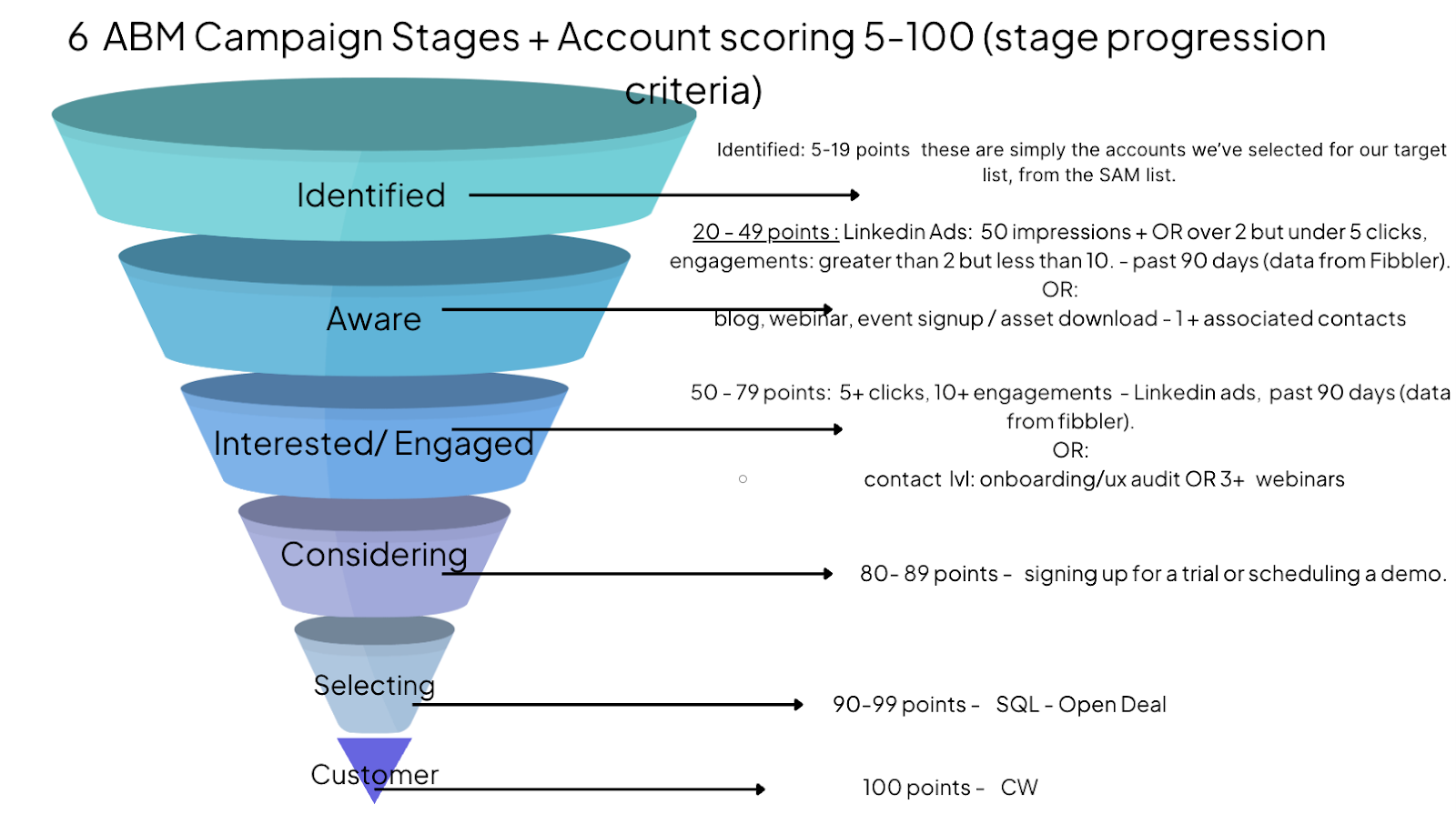
The accounts in each state are then shown different content (ads) – the further down the funnel, the more product-oriented the content:
If this sounds simple – it is.
But surprisingly it wasn’t easy to arrive at this *simple* account scoring model – at first we really overcomplicated things, adding a combination of factors such as page visits (qualitative/intent signals) and weights to specific ads/ page visits.
This proved to be too hard to execute – for once because, as we learned the hard way – website visitor deanonymization is too unreliable to use for consistent account scoring. The accounts we were targeting simply wouldn’t show up in any website visits, even though we knew they landed on the landing pages for the ABM ads we created specifically for them.
How do we know? We’ve actually set up a separate no-index domain for our ABM ad campaigns to be sure 100% of the traffic landing there is our ‘target accounts’. And sadly, from the ~300 visitors to a certain page path on that website – in 90 days, Breeze Intelligence (based on Clearbit’s API) identified only 1 company…ourselves!

And according to a study by Syft – Clearbit is actually the most accurate from many popular deanonymization services 😬

So we decided to simplify the account scoring – and use only quantitative ad engagement data from Linkedin in our CRM and use the qualitative aspect (which ad campaign groups – organized by intent – the accounts engaged in) for personalizing the follow-up email & LinkedIn outreach.
Now, there’s also another aspect you need to consider before structuring your ABM campaigns around the account stages – your audience size. Since the minimum audience size to run ads on LinkedIn is 300 members (and the smaller the audience, the more expensive your ads – as the CPMs (cost per 1000 impressions) goes up when you target more “niche” audiences!)
So in practice – divide your LinkedIn ABM campaigns between the “COLD” (identified + aware) and “WARM” (interested + considering = retargeting audience that showed interest) but leave the more granular ABM stages for the sake of a) understanding and tracking how your campaigns are going; b) passing the “interested” accounts to your BDR team/ pushing them into automated outreach.

First – we’re pushing the company-level engagement data from LinkedIn Campaign Manager to Hubspot.
As of January 2025 – you can’t do this natively.
So at first – we found a cool and cheap (we were paying $69 per month) tool that acts as a LinkedIn API data connector for Hubspot.
Then – when we realized the tool pushed only quantitative engagement data into the CRM, not qualitative ones (which campaigns the company engaged with – we use that information for personalising BDR outreach) and didn’t have any of the ABM stages features or analytics – so we decided to build our own API solution (and this is where with my husband came into the picture) – ZenABM.
That way, we can push both quantitative campaign engagements and qualitative ones into company properties on Hubspot:


Since the campaigns are already segmented by intent, 12 in our case, we can then create a workflow to assign the respective intent(s) in a custom multiple checkboxes company property on the company level based on the campaign names/intent coming in from ZenABM. Then when the BDRs do the prospecting themselves and create leads, the associated company’s intent(s), from the custom property, gets copied to the lead level as tags. This helps the BDRs reach out with very relevant, targeted messages – based on what the company members are already engaged with:
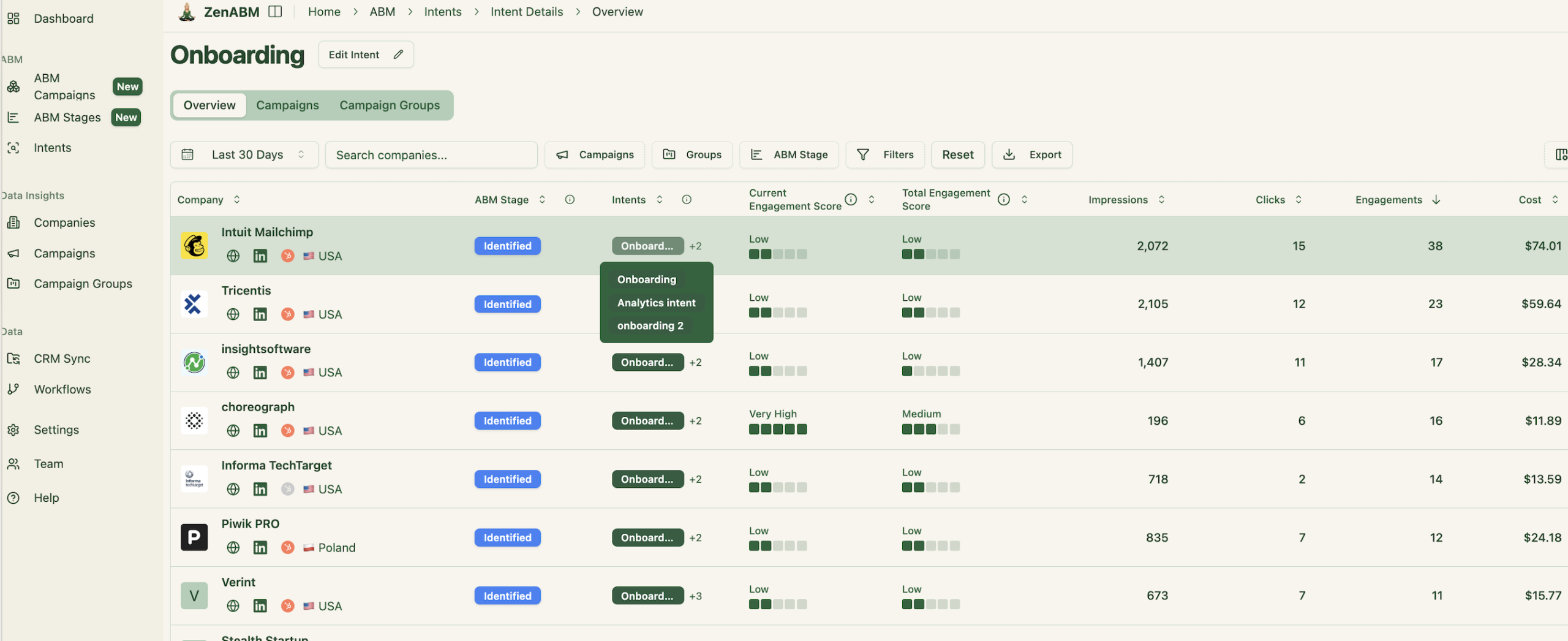
So – to sum up – using ZenABM we push the ad engagements and clicks on a weekly basis into custom Hubspot company properties – “LinkedIn Ad Engagements – 7/30/90 days” and “LinkedIn Ad Clicks – 7/30/90 days”. ZenABM also pushes and automatically updates the the account ABM Stage into Hubspot (“Aware”, “Interested”, “Considering” etc.) – which we then use for follow-up LinkedIn and email outreach.


Then – we created Active accounts Lists on Hubspot with list membership based on being in a specific ABM stage and the thresholds of “cumulative LinkedIn Ad Engagement/ Clicks”. We have a separate list for each stage of each campaign:
To calculate a realistic ABM budget you need to have ABM revenue goals set first. Then you need to work your way backwards to from your revenue target – knowing your deal close rate, qualitifcation rate etc. – to how many Target Accounts you really need to target. And then – looking at your historical LinkedIn ad performance benchmarks – CTRs, CPCs and CPMs – or industry benchmarks – you can see if you what budget you need to realistically set to reach enough of these accounts:

How did we know how many accounts we should target, or what budget to set? After we decided to use Kyle’s ABX benchmarks, we then set a revenue goal for this initiative and ACV – and worked our way backwards (knowing our close rate and qualification rate).
So let’s assume you want to close $ 1 million in revenue from ABM in 2025. Your ACV is $50k. Your close rate is 25% and your qualification rate is 75%.
So, the first big question is…
1,000,000 in ARR / 50k in ACV = 20 deals
So we’re looking at: 20 / 0.25 / 0.75 / 0.18*/ 0.32/ 0.55 = 3367 accounts that you need to target to hit your revenue target.
How much budget will you need for that? That depends on your CPMs and Cost per Conversion from the channels you pick. Knowing 55% of your target accounts will become aware, and then – 32% of those will be interested, and 18% will be considering (will have booked a demo) – you will need approximately 107 accounts to convert into demos.
If your cost per conversion is $1100, you’re looking at a $117,700 LinkedIn ad budget. You can also try to calculate it (more accurately) based on your average CMPs, CTRs and landing page conversion rates.
You can also look at your average cost per click to Landing Page – and the conversion to demo rate. Dividing your target number of demos by the demo conversion rate will give you the number of visitors you need to drive to your LPs. Then multiplying this by your average cost per click will give your ABM budget. Let’s take a look at an example:
The average CTRs are ~ 0.35% – 0.45%. So for every 1000 impressions – you get only 3-4 clicks. How many clicks do you need to book a demo? Let’s say your great landing pages convert at 1% rate.
So to generate 107 demos with a 1% landing page conversion rate and a 0.4% CTR, you would need approximately 2,675,000 impressions.
Let’s say your CPM is $55. You’ll need to spend $55 x 2,675 = $147,125. LinkedIn doesn’t distribute impressions equally between accounts though – use tools with impressions cap like Factors.ai to cap impressions per account.
This is of course an approximation – you may want to set aside 15-20% extra for a ‘margin of error’.
Answering this question before launching your ads is super-important – so you can avoid budget dilution. We made this mistake quite a few times – launching too many ads per campaign.
Why? As Ali Yildrim wrote – allocating budget to campaign is a “simple math”. Let’s say you want to run a LinkedIn Image ads campaign consisting of 5 ads – how much budget would you need to allocate to this campaign to get a meaningful number of clicks?

This is an example of a LinkedIn ad campaign that didn’t have a chance to succeed:


Most underperforming LinkedIn campaigns don’t fail because of bad targeting or weak creatives – they fail because each ad never gets enough budget (doesn’t get served enough) to generate any useful data to inform you how it’s performing.
Once you look at your total budget first (instead of ideas first), then the campaign structure you can actually afford becomes obvious.
When you divide your monthly budget by 30, you get your real daily spend limit.
That number determines how many ads you’re allowed to run – not how many you want to run. Based on this (and which campaign types – single image ads, carousel ads, video ads) – you want to run – you can then determine how many personas/ intents you can target.
The math works like this:
Average CPC: let’s say $8.
Goal: 3–4 clicks per ad per day
Based on this campaign outline and the math above – how many ads can you run with a $10,000 monthly budget and $8 cost per click? How many different personas can you realistically target?

$4,800 + $4,800 + $1,900 + $2,880 + $250 = $14,630
So in fact, you don’t even have a budget to run one “full on” campaign – I’d do maybe just one video ad, and 1 carousel to stay within the $10k budget.
Also – as you can see – with a $10k budget and $8 cpc you can’t really experiment with splitting your campaigns by persona or by intent. You need to mix all the personas or intents in, or just focus on one persona /intent at a time.
I’d strongly recommend you follow this math to avoid the mistakes I made, and make sure that:
Here’s how you can calculate how many ads (in total) you can “afford” to run per month:
As I mentioned before, for starters we used only LinkedIn Ads. We’ve also set up a separate no-follow entity (lookalike website that functions as a set of landing pages) for ABM ad destinations – and are planning to use it for running retargeting ads on Google Display networks. Specifically across a preferred set of 100 publications only, and then Gmail & YouTube via their Demand Gen campaign type.
We’ve toyed with using our lead lists directly on Google Display – but the match rates were too low (nobody’s using company emails on Google Accounts…) to run them.
For our first campaign, we “recycled” the account list we used for cold outbound in H1. That list was based on the “win-loss” analysis we did on our growth and enterprise deals, and used various targeting filters like company size, location etc. We only enrolled the companies that didn’t convert before.
We also targeted accounts using specific technologies (where relevant for a specific ABM campaign). The second campaign was based on this, and targeted a specific segment of accounts in our SAM that were using a specific technology.
For this we used Clay and Builtwith’s API to build the list.

Depending on the focus of each ABM campaign, we use different additional selection criteria for the companies we want to target. For example, for a campaign focusing on our new “Session Replay + Analytics” features, we would target lookalike companies to our enterprise customers, that also match the following:
Firmographic Fit:
Technographic Indicators (from BuiltWith or similar tools):
We also tap into our CRM data to uncover the right-sized accounts that we previously lost to competitors because of missing features:

Once we have a list of accounts we want to target, we add them to the right ABM campaign list on Hubspot.
Initially, we used contact lists on LinkedIn ads to target our accoutns byr relevant personas (e.g., PM, UI/UX, PMM, CXO) and we had to find their specific email addresses in Clay. This quickly became *very expensive* (finding email addresses on Clay even through cheap APIs like e.g. Leadmagic costs money, let alone Clay credits, but the worst was Marketing Contacts on Hubspot – to let you move the accounts between different audiences and LinkedIn ad campaigns when they’ve hit the “interested” account stage – because contacts in these HubSpot active lists were sent to LinkedIn Campaign Manager using HubSpot Ad Audiences for dynamic ad targeting:
Note: After the match is completed on LinkedIn, you should have at least 300 LinkedIn members to start a campaign. Additionally, all these contacts must be mapped as marketing contacts; otherwise, they will not be sent over.

So what we started doing instead is just pushing Company Lists from Hubspot to LinkedIn Ad Campaigns – and filtering those by LinkedIn Campaign Manager’s native ad filters:

Btw. FYI – it usually takes around 48 hours for your audience to get ready on LinkedIn after being synced. Once available, you can use these lists with LinkedIn targeting options and add additional filters to further narrow down your audience for more precise targeting.

Now that the audience is ready, we can start running our ads.
All our accounts start in the “identified” stage. However, as soon as an account meets the ABM stage benchmarks (e.g., when an account receives more than 5 clicks, it moves to the “interested” stage – and the “awareness” ads are paused for them, and they are automatically enrolled in the “interested” stage ads).
You can make your stages more sophisticated in ZenABM by combining different company properties from your CRM:

The active lists on Hubspot are automatically updated based on this “ZenABM stage” company property, and since these lists are used on LinkedIn, they are updated there as well. This ensures that accounts are removed from the “identified” list and added to the “interested” list, and targeted with ads that are more aligned to their current stage.
This segmentation allowed us to craft highly targeted messaging tailored to each persona’s pain points and their position in the ABM funnel.
The LinkedIn campaign groups were structured based on the persona and their ABM stage, while the campaigns within each group focused on specific messaging themes such as their job to be done, potential benefits, and relevant case studies.


For example, in the screenshot above, the first ad is targeted at accounts in the awareness stage for PM personas and introduces our product by highlighting various jobs to be done by the PM persona. The second ad, targeted at PMs in the consideration stage, showcases a case study of a similar persona and the value they derived from using our solution.


This segmented and personalized approach to ads significantly boosted engagement by ensuring the messaging resonated with the specific needs and challenges of each persona at their respective ABM stages.

Before we started working on the content for the campaigns (ads, landing pages etc.) – we had to decide on how we’re going to structure the content based on the “ABM Campaign stages” and how LinkedIn Ads work.
For our first Campaign – the “Product Drive 2024” campaign – we targeted a list of 1417 accounts that we didn’t manage to convert from cold outbound in H1 2024.
We then split those accounts into 8 separate personas – and created separate LinkedIn ad campaigns (with messaging personalized to each persona’s JTBDs!) for each of them.

Since we were uploading contact lists for each persona to LinkedIn for each campaign, and could fetch company engagements per campaign with ZenABM – we thought this would allow us to gauge intent per account based on campaign engagements and target the right personas with BDR outreach with surgical precision.
There was a big opportunity in this – but also a catch in terms of LinkedIn (API) limitations (that we didn’t know about & had to create a workaround for in subsequent campaigns.)

So we went back to the drawing board, and created a campaign structure based on Campaign groups based on shared intent rather than persona – with different personas in each campaign group (but we would still exclude some personas where the Campaign group intent wasn’t relevant!)

This solved the three limitations above:
Honestly, with the experience I’ve had so far – I would recommend simplifying things:
only have 2 stages of campaigns – 1) Identified/Aware (Cold) and 2) Interested/Considering (Warm) – as per the table below;
Now – if you don’t have Hubspot Marketing or another audience management tool to move accounts that moved to the interested stage of your ABM campaigns between the COLD and WARM – you can use “Retargeting” based on the COLD campaign ad engagement on LinkedIn to move accounts between the two campaign layers (although then you can only use ad engagement as your criteria for moving stages – e.g. with ZenABM, as I wrote before, we can add e.g. website visits or lead magnet downloads as “interested” criteria on top of ad engagements as well.)

The big thing is not to overthink the campaigns – you don’t want to have too many ads per campaign, because you’ll have run out of budget before you’ve gotten enough clicks (remember what I wrote in the “How to distribute your LinkedIn ABM budget between different LinkedIn campaigns?” section above? Your budget determines how many ads you can realistically run – let’s play it again: each of your ads needs to get enough daily spend to generate enough clicks to give you statistically useful data!
Average CPC: $5–$10 (≈ $7.50 used in examples)
Minimum meaningful daily spend per ad: ~$25/day
Goal: 3–4 clicks per ad per day
Anything below that = slow learning, false positives/negatives and wasted spend.

I’ve discussed the math behind this earlier in this post and can’t stress how important it is to follow it.
Now that I’ve talked about how we structured the campaigns, decided on goals and budgets, and how we manage the asset creation process – it’s time to get down to the bottom of which assets we’re actually using in our ABM campaigns.
As you know – we’ve settled on LinkedIn as our (for now only) channel – and we’re using different types of ads there, with the following mix from most used to least used:

In terms of inventory performance – the single image ads had the highest CTR and the lowest cost per click to landing page – followed by video ads and thought leader ads. The DM ads so far have been extremely expensive in terms of cost per conversion.

We use text ads to generate brand awareness – as they result in a high number of impressions at a negligible cost, but rarely translate into clicks. I also wonder how many people actually do notice these ads as they are quite *inconspicuous* on LinkedIn (to say the least…)
TLAs seemed great when it comes to the CTRs – but this metric is a bit misleading for LinkedIn Thought Leader Ads, as they count every click on the ad – including “read more”, author’s profiles , people tagged etc.

But they are very successful in driving attention to more “top of the funnel” assets like events and webinars – especially if the posts are coming from influencers popular with the ICP (and they are speakers at the promoted webinars/events). So in the upcoming campaigns, we are planning to use them in moderation in the “awareness” stage.
How many of the different types of ads are we using per campaign? This is what our inventory split per campaign currently looks like (and it’s evolved) over time:
Now, I mentioned that image ads performed best for us, followed by video ads and TLAs – this was not the case when I did my research into the ad performance of 211 companies that were ZenABM users:
Hence – we realised it was our TLAs that weren’t the best and needed improvement 😬 so we are now also changing our ad campain structure a bit to include more TLAs and fewer videos (which are the hardest to produce).
Here are our top performing ads from our first ABM campaign:


As part of the campaigns, we’re also working with the BDRs on the email sequences they send to the relevant personas in the accounts that reached the “interested” stage.
How did we manage the process of creating all assets for all these different campaigns and personas without getting lost in it, and keeping our campaign names (which inform us about the intent!) in order?
Well, this is also something we had to grapple with at the beginning. Since our whole marketing team is a power user of Notion database to run different marketing campaigns & manage the work between different functions – we tapped into Notion databases for ABM asset creation management too.
The important aspect of using Notion databases is creating the campaign group, campaign and ad names – which we then use to tease out company intent from campaign engagements based on the keywords included in the campaign names. So it was super-important for us to keep those “clean”. We did that with a formula concatenating the relevant properties into the asset/campaign names:


Using this database, we would also assign the assets to specific “asset owners”, create asset brief templates, and assign the graphics creation task to our graphic designers automatically once the “asset owner” (another team member) ticked off the “asset brief done?” field.
We also use it to track which assets have been launched and which haven’t yet:

As I described before, we calculated a “reasonable” budget by reverse-engineering our revenue target, assuming a conversion benchmark at each stage of the campaign. At the beginning we were spending ~ $20k per month, and
After running 2 campaigns so far, we’re already getting feedback in terms of how the campaigns are performing compared to the benchmarks we set – and can use the weekly number of accounts that passed through the stage thresholds as “leading metrics” to evaluate how well our campaigns are going.
In terms of team, I’m lucky to have found an *amazing* ABM manager (Siddhesh) and have an equally amazing Marketing Ops manager (Bilal), 2 full-time, in house graphic designers (Teo and Ivana) and a very seasoned growth/performance manager (Tiana).
Pro TIP: Don’t even *think about* starting ABM without having a marketing ops manager. The amount of revops work to set this up is brutal. Unless you have ZenABM 😉 – this is exactly what we’ve been trying to achieve with my husband when we started working on it – reducing the amount of revops required to run ABM campaigns & attribute revenue to them!
It took us a *long* time to pick our tool stack for these campaigns – mostly because a) most ABM tools are extremely expensive and don’t offer trials (it’s an investment of $60k at least, the best deal we got was $30k and it was multi-year) b) based on Reddit reviews we’ve been reading, we weren’t even convinced *they would work*. In our niche, the intent is very peculiar and the search volume for “high intent” keywords is low. So tools that offer third party intent signals based on Bambora’s data weren’t good enough. “Custom intent” solutions are expensive. And based on the results we got from Breeze Intelligence (which is a website deanonymization solution offered together with Hubspot Marketing) – I wouldn’t be confident in intent based on reverse IP-lookup anyway.
So pretty quickly, we made up our mind that we want to run our ABM campaigns mostly on LinkedIn, and find a tool that would show us account engagements per campaign, and push the engagement signals to Hubspot. We almost found that tool in Dreamdata – the only catch was that they weren’t offering a bi-directional CRM sync, and so we would need to implement a data workhouse and a reverse-ETL to push the data to Hubspot. Which we definitely didn’t have the resources for…🫠
Since most ABM tools focus on display advertising on Private Advertising Networks (which makes) ultimately we decided to go with Hubspot + Apollo (which we stopped using after Hubspot launched their “sales workspace” – essentially a sales engagement solution – it makes it easier to keep everything in one tool!) + ZenABM.
So, to sum up, we are currently using:
The toolstack is costing us ~$2500 per month

That was another tricky part. Apart from Kyle Poyar’s ABX benchmarks, couldn’t find a lot on specific ABM stage conversion benchmarks. Comparing ad benchmarks to other companies is a bit like comparing apples and oranges…And since we chose Hubspot Marketing rather than a dedicated ABM tool – intially we had to build all the reporting dashboards ourselves. After a while, since these Hubspot dashboards were taking *a lot* of time to build in Hubspot and would sometimes break (and it was difficult to then troubleshoot them with all the different filters…) – we eventually switched to ZenABM reporting dashboards (which of course I had the luxury of influencing quite heavily 😉)

In any case, these are the metrics we decided to monitor:
Our first ABM Campaign – the “Product Drive Campaign” – centered around different buyer’s personas and the different pain points that Userpilot solves for them. We wanted to capture more leads by using our (very popular – we had over 6,200 signups in 2024!) online conference – Product Drive – as the “gateway asset” for the target accounts.
We published ~100 ads for 8 different personas, spending $46,791 in LinkedIn Ad spend.
To sum up, after our first ABM campaign ended, we can report on the following results:
Accounts Touched: 1,417
Total Cost: $46,791 + 5400 = ~ $52191 (LinkedIn Ad spend + tools)
Pipeline Generated: $440K ($655 in 3 months – we launched the 2nd campaign after 2 months of launching the first one).
Pipeline per Dollar: $8.43 ($12 on average from both campaigns)
Assets: ~100 ads for 8 personas (images, videos, TLAs, DMs, text, docs)
Single-Image Ads: 1,172 clicks, 0.35% CTR, $19 CPC
Video Ads: 313 clicks, 0.28% CTR, $24 CPC
TLAs: 4.42% CTR but $68 CPC (LinkedIn counts every click, including “see more”)
Team: 4.5 people full-time (1 ABM manager, 0.5 performance manager, 1 MOps manager, 1 head of marketing, 0.5 demand gen + 0.5 PMM, 1 graphic designer.)

Accounts Touched: 26,315
Total Cost: $490,000 (LinkedIn Ad spend)
Pipeline Generated: $5,290,737
Pipeline per Dollar: $10.79
Assets: 500+ ads (images, videos, TLAs, DMs, text, docs)
Team: 4.5 people full-time (1 ABM manager, 0.5 performance manager, 1 MOps manager, 1 head of marketing, 0.5 demand gen + 0.5 PMM, 1 graphic designer.)
Cold outbound alone took us 2x as long and cost 51% more to generate the same pipeline. Starting ABM wasn’t by any means easy (the ops were still brutal) but it was as hard in terms of setup as cold outbound – but faster to drive pipeline and less human-resource intense (we actually shared asset creation between almost all marketing team members except for the content team.)
I believe either way, we were still harvesting demand rather than generating it. And it’s just easier and faster to do it by showing people a smorgasbord of different messaging and seeing what resonates to gauge intent (more on how we do it later) – then asking them on the phone.
Hope this was helpful/inspiring – if you have any questions, don’t hesitate to reach out to me on LinkedIn!


